What Is the Best Video Doorbell Without a Subscription? (2026, for Renters and Homes)
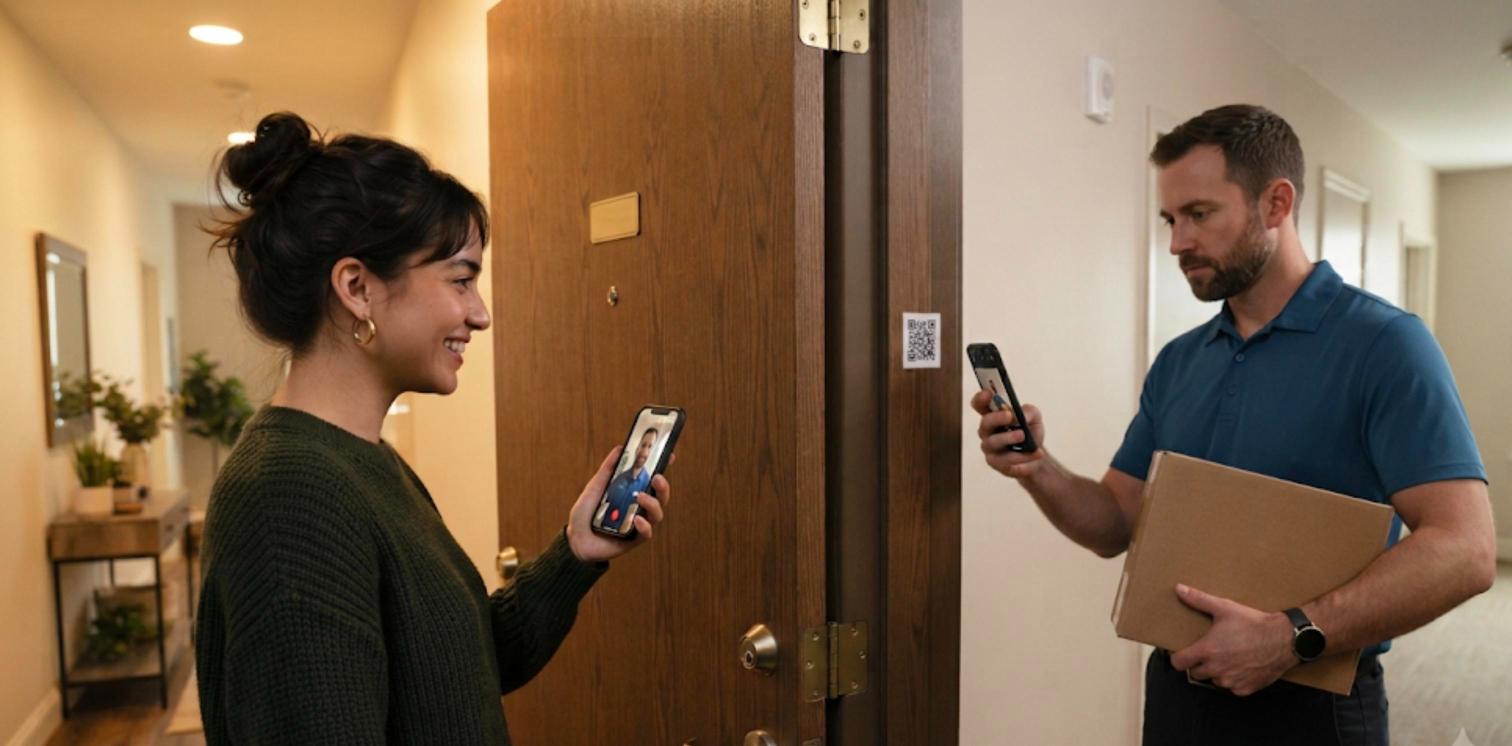
Quick Answer: For most renters and single homes, the best video doorbell without a subscription is a QR video doorbell such as DoorVi: the app is free, nothing is drilled or wired, and visitors video-call your phone from theirs. For recordings with no monthly fee, pick a microSD camera doorbell such as the Eufy C31 or Tapo D225.
DoorVi (Recommended): a QR code or weatherproof tag on your door and a free app. Visitors call you from their own phone, with no app to install. No camera, battery or plan to pay for, and your phone number stays hidden. Support tickets are resolved within 24 hours.
Get the free DoorVi appKey takeaways
- "No subscription" means two different things: a doorbell that never needs a plan (DoorVi, or a camera that records to a microSD card) or a doorbell that works without a plan but loses features (Ring, Google Nest).
- DoorVi (Recommended) costs $0 with a printed QR code, or from $8 for a weatherproof tag. It connects a live video call; it doesn't record your doorstep.
- The Eufy C31 (about $69.99) and Tapo D225 ($84.99) record to a microSD card you buy separately, with no monthly fee.
- Ring keeps no recordings without a plan (from $4.99 a month); Google Nest keeps only 3 to 6 hours of event history for free.
- Over a two-year lease, a Ring Battery Doorbell on the Solo plan costs about $218; DoorVi costs $0 to $8.
Picture a common scene: you're at work, a courier knocks on your apartment door, and the package ends up in the hallway. You bought a doorbell camera to stop that, and now the app asks for a monthly plan before it will save the clip. Consumer Reports notes that Ring doorbells need a subscription of about $5 to $20 a month to save recordings and get features like person alerts (Consumer Reports). If you rent, you also can't drill, may not be allowed to point a camera at a shared hallway, and have to take everything with you when you move. So the useful question is: which doorbell does the job you need with no monthly fee at all?
How a no-subscription video doorbell works (4 steps)
- Pick the job: answer the door from anywhere (a live call), or keep a record of who came (a recording).
- Pick the storage: a live call needs no storage. Recordings go to a microSD card in the doorbell or a home hub, instead of a paid cloud.
- Mount it without drilling: a QR sticker or tag, or an adhesive or no-drill mount for a battery camera.
- Answer on your phone: the visitor rings or scans, and your phone gets the call or alert.
What does "video doorbell without a subscription" mean?
A video doorbell without a subscription is one whose core job, letting you see and talk to the person at your door from your phone, works with no monthly plan. Some doorbells also keep recordings for free by saving them on a memory card; others only show live video unless you pay.
There are three kinds:
- QR video doorbells (DoorVi): a QR code on the door turns the visitor's phone into the doorbell. Nothing to power, nothing to record, nothing to subscribe to.
- Local-storage camera doorbells (Eufy, Tapo, Aqara, Reolink, Lorex): a camera saves clips to a microSD card or hub at home. Consumer Reports' list of doorbells without a subscription is made up of models like these, all of which store footage locally.
- Cloud camera doorbells with a free tier (Ring, Google Nest): they work without a plan, but recordings and smart alerts sit behind a subscription.
What is a QR video doorbell?
A QR video doorbell is a QR code on your door that starts a video call from the visitor's phone to yours. The visitor scans it with their phone camera, a page opens in their browser and they tap call. No app is needed on their side (DoorVi FAQ).
DoorVi, a QR-code video intercom and visitor management platform, offers this for single homes and apartments as a free app. You print your QR code and stick it on the door, or buy a ready-made weatherproof tag from $8; premium plans are available inside the app (DoorVi pricing). Visitors can't see your phone number unless you turn on "Callback Number".
Why the subscription question matters more for renters
- The lease. Many leases restrict alterations and recording devices aimed at shared areas. One law firm that advises landlords recommends lease language saying residents may not install security devices that record outside the unit without permission (Kelley, Thomas & Shaw).
- The door. Apartment doors usually have no doorbell wiring and no outlet, so it's battery or nothing for a camera.
- Move-out. A sticker peels off. An adhesive mount usually does too, but Ring's No-Drill Mount can't go on glass (Ring support).
- The plan. A monthly fee over a two-year lease can add up to more than the doorbell.
Best video doorbells without a subscription: comparison table
Our pick: DoorVi (Recommended). The lowest total cost, nothing to charge or steal, no plan needed, and visitors call from their own phone. Choose a microSD camera doorbell only if you need recordings.
| Doorbell | Type | Upfront cost | Monthly fee needed? | What you get with no plan | Drilling | Power | Visitor uses own phone | Support |
|---|---|---|---|---|---|---|---|---|
| DoorVi (Recommended) | QR video doorbell | $0 printed QR; tag from $8 (DoorVi) | No (premium plans optional) | Live video calls to every member of the address | None (sticker or tag) | None | Yes | Tickets resolved within 24 hours |
| Eufy Video Doorbell C31 | Camera, local storage | $69.99 (Walmart, Nov 2026) + microSD card | No | Live view and recordings to microSD (card sold separately) | Mount needed | Battery or wired | No | – |
| Tapo D225 | Camera, local storage | $84.99 (Tapo US store) + microSD card | No | Recordings to microSD up to 512 GB; Tapo Care cloud optional (Tapo) | Mount needed | Battery or wired | No | – |
| Google Nest Doorbell | Camera, cloud | See Google Store | For full history | 3 to 6 hours of event history (Google); Google Home Premium $10 or $20 a month (TechRadar) | Mount needed | Battery or wired | No | – |
| Ring Battery Doorbell | Camera, cloud | $99.99 (Tom's Guide) + $17.99 No-Drill Mount (T3) | For recordings | Live view; no saved recordings without a plan; Solo $4.99/month or $49.99/year (Ring) | Adhesive mount, not on glass | Battery | No | – |
DoorVi is listed first because this is our guide. Competitor prices are from the sources linked, checked November 23, 2026; prices change often, so confirm before you buy.
On a phone? The same list:
- DoorVi (Recommended): $0–$8, no plan, no battery, visitors call from their phone, number hidden, support within 24 hours.
- Eufy C31: about $70 plus a microSD card; records locally with no fee.
- Tapo D225: $84.99 plus a microSD card; records locally with no fee.
- Google Nest Doorbell: 3–6 hours of free event history; $10–$20 a month for more.
- Ring Battery Doorbell: about $118 with the No-Drill Mount; recordings need a plan from $4.99 a month.
Two-year cost for a renter (worked example)
Assumptions: a 24-month lease, one doorbell, US prices checked November 23, 2026, the cheapest plan that keeps recordings where one is needed, before tax.
| Option | Upfront | 24 months of fees | Two-year total |
|---|---|---|---|
| DoorVi, printed QR (Recommended) | $0 | $0 | $0 |
| DoorVi, weatherproof tag | $8 | $0 | $8 |
| Eufy C31 + microSD card | $69.99 + card | $0 | About $70 plus the card |
| Tapo D225 + microSD card | $84.99 + card | $0 | About $85 plus the card |
| Ring Battery Doorbell + No-Drill Mount + Solo (annual) | $117.98 | $99.98 | About $218 |
Google Nest is left out of the total because the doorbell price varies by model; Google Home Premium Standard adds $100 a year (TechRadar).
The renter's journey with a no-subscription doorbell
The courier or visitor
With DoorVi, the courier sees the QR code on your door, points their phone camera at it and taps call. They never see your number. With a camera doorbell, they press the button and the camera streams to your phone.
You, the renter
With DoorVi, your phone rings with a video call wherever you are. You can ask the courier to leave the box with a neighbor or come back later. Roommates added to the same address get the same call; the number of members depends on the plan (Silver up to 4, Gold up to 6, Platinum up to 20, per the DoorVi FAQ). With a microSD camera, you get an alert and can review the clip later from the card; every few months you recharge the battery.
Your landlord or property manager
A QR sticker has no camera pointing at the hallway and leaves no holes, so there's usually nothing to approve. A camera doorbell may need written permission if it records a shared corridor.
If your building has a locked front door
Your apartment doorbell only helps once visitors reach your door. If you want visitors to call you from the street and have the lobby door open, that's a building decision: DoorVi for buildings opens existing doors and gates through a Wi-Fi relay, ProdataKey (PDK) or Brivo, for up to $5 per apartment per month with no setup or installation fee (DoorVi pricing). You can show your property manager the 20-second interactive demo.
- Day 1: DoorVi takes about 10 minutes (install the app, print or stick the code, test it with a friend). A camera doorbell takes about 30 minutes plus charging and inserting a card.
- Week 1: add roommates to the DoorVi address; on a camera, set motion zones so neighbors walking past don't trigger alerts.
- Month 1: decide whether you want a weatherproof tag or a premium DoorVi plan; on Ring or Nest, the free trial ends and the plan decision arrives.
Where DoorVi fits best
- You want to answer the door from anywhere for $0. The app is free and a printed QR code costs nothing.
- Your lease or building doesn't allow cameras in the hallway. A QR code records nothing.
- Several people share the apartment. One code rings everyone on the address.
- You don't want anything worth stealing on the door. No camera, no battery.
- Your number should stay private. Visitors don't see it unless you choose to share it.
- You have a gate or a car too. The same app covers a home gate with a Wi-Fi relay (gate automation without new wiring), and the DoorVi QR tag for cars and vehicles lets people reach you about a parked car without your number, one of the simplest parking solutions for shared lots.
- Support within 24 hours: DoorVi resolves support tickets within 24 hours.
When another doorbell makes more sense
- You need evidence of package theft. DoorVi doesn't record your doorstep. A microSD camera like the Eufy C31 or Tapo D225 does, with no fee.
- You want alerts when someone is at the door but doesn't ring. That needs a camera with motion detection.
- You already pay for Ring or Google Home Premium. Adding a doorbell to a plan you already have may cost nothing extra.
- You own a house with doorbell wiring and want 24/7 recording. A wired local-storage doorbell is the stronger choice.
You can also use both: a QR code for visitors who need to reach you, and a camera for a record of the doorstep.
How to set up DoorVi as a no-subscription video doorbell
- Install the free DoorVi app and create your address.
- Print your QR code from the app, or order a weatherproof tag from the DoorVi shop.
- Stick it on your door at eye level, away from glare.
- Ask a friend to scan it and call you, so you know notifications get through (allow DoorVi through Do Not Disturb if needed).
- Add roommates or family to the same address.
Watch how it works on the DoorVi videos page.
FAQ
Is there a video doorbell with no monthly fee at all?
Yes. DoorVi's app is free for a single home or apartment and needs no plan to receive video calls. Camera doorbells that record to a microSD card, such as the Eufy C31 and Tapo D225, also have no required fee.
Does Ring work without a subscription?
A Ring doorbell still rings your phone and shows live video without a plan, but it keeps no recordings. Saving and reviewing clips needs a Ring Home plan, from $4.99 a month or $49.99 a year for one device.
How much video does Google Nest keep without a subscription?
Google says Nest doorbells keep up to 3 hours of event video history with no subscription, or up to 6 hours of short event previews on the newest models. Google Home Premium Standard extends that to 30 days.
Does DoorVi record video?
No. DoorVi connects a live video call between the visitor's phone and yours. If you need a recording of your doorstep, add a local-storage camera.
Can I use a no-subscription video doorbell in an apartment without drilling?
Yes. A DoorVi QR code is a sticker or tag, and most battery camera doorbells can use an adhesive or no-drill mount. Check your lease before pointing any camera at a shared hallway.
Do visitors need an app to use a QR video doorbell?
No. Visitors scan the code with their phone's camera and the call opens in their browser.
What support does DoorVi provide?
DoorVi's support team resolves tickets within 24 hours.
Does DoorVi work outside the US?
Yes, the app works with any smartphone. In the UK, DoorVi's partner doorvi.co.uk also sells DoorVi QR video doorbells for homes.
Related questions
- How do you get a video doorbell without drilling? (renter's guide)
- Ring or a QR video doorbell: which is better for renters? (comparison)
- How do renters stop package theft in apartment buildings? (package theft guide)
- How can renters answer the building buzzer from their phone? (Ring Intercom alternatives)
Get a video doorbell with no subscription today
Get the free DoorVi app, print your QR code and you'll have a working video doorbell in about 10 minutes, with no plan, no drilling and no battery. Want to see the visitor side first? Try a visitor call in 20 seconds. Managing a building? Book a free demo. Support tickets are resolved within 24 hours.
About the author: DoorVi Team. DoorVi builds QR-code video intercoms and visitor management for single homes, apartment buildings and gated communities, including door and gate opening through relays, ProdataKey (PDK) and Brivo.
Last updated: November 23, 2026