PDK Intercom Integration: Add Video Visitor Calling to Your ProdataKey System
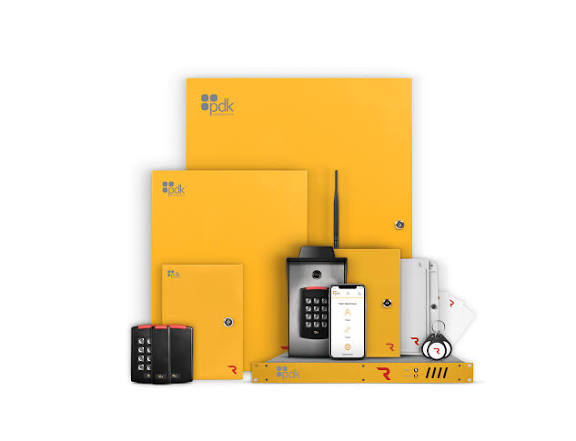
Quick Answer: DoorVi is an official ProdataKey (PDK) integration partner. A visitor scans a QR code, video-calls the resident, and the resident taps Unlock in the DoorVi app, which triggers the linked PDK door or gate. PDK keeps controlling credentials and locks; DoorVi adds the visitor-facing layer.
How the PDK integration works
- A visitor scans the DoorVi QR code at the gate or entrance. No app download is needed.
- They pick the resident from the directory in the browser.
- The resident gets a video call in the DoorVi app.
- The resident taps Unlock, and DoorVi triggers the linked PDK door or gate.
- PDK unlocks, and the visit is logged with the timestamp, the unit and who granted entry.
What stays in PDK and what DoorVi adds
PDK is a cloud-based access control platform used in gated communities, offices and multi-tenant buildings. It controls the lock but has no visitor-facing communication layer. DoorVi does not replace PDK. It works alongside your existing setup and does not change your existing access rules.
| Stays in PDK | DoorVi adds | |
|---|---|---|
| Doors, gates and locks | PDK keeps controlling them | DoorVi triggers the linked PDK door or gate when a resident taps Unlock |
| Credentials and access rules | Existing credentials, fobs and rules keep working | Nothing to change |
| Visitors | PDK has no visitor-facing communication layer | A QR code at the gate, a video call to the resident, six-digit guest codes and visitor pre-approval passes |
| Visit log | Your existing PDK setup stays as it is | A visitor log with the timestamp, the unit and who granted entry |
| Management | The PDK dashboard, where you enable DoorVi under Integrations | The DoorVi admin dashboard at multi.doorvi.co, which covers several properties, and the Guard Doorman app |
Set it up in about 20 minutes
DoorVi is listed inside PDK's Integrations area. The setup guide has 15 steps and takes about 20 minutes. The short version:
- In the PDK dashboard, open Integrations and enable DoorVi.
- In the DoorVi panel at multi.doorvi.co, open PDK Manager and choose Add New PDK.
- Enter a PDK System Name and the System ID, which you find in PDK under System Settings > General.
- Add the building and its locks.
Follow the full PDK setup guide for every screen.
Who this is for
- Integrators who already sell and install PDK and want to add visitor video calling to the doors they control.
- Property managers of gated communities, offices and multi-tenant buildings that run PDK.
- Owners who want gate automation: a resident unlocks a PDK-controlled gate from the DoorVi app after a QR video call.
- Sites with gated or visitor parking that need parking solutions for entry. The same call-and-unlock flow works at a parking entrance, and the DoorVi for Cars and Vehicles QR tag lets people reach a car's owner about wrong parking, an accident or roadside help.
Where DoorVi fits best
- You already sell PDK. DoorVi is an official PDK integration partner.
- Your customers want visitor video without a new entrance panel. Visitors use their own phones, and there is no wiring to each unit.
- You want to keep existing credentials and rules. Fobs and PDK access rules keep working.
- You manage several properties. One DoorVi dashboard covers them, with six-digit guest codes, visitor pre-approval passes and a visitor log.
- Support: DoorVi's support team resolves support tickets within 24 hours.
When another option fits better
- The client wants a physical video panel at the door. DoorVi uses a QR code instead.
- Your doors are not on PDK. See the integrations hub for Brivo and relays.
Frequently asked questions
Does DoorVi replace PDK?
No. PDK keeps controlling your doors, gates, credentials and access rules. DoorVi adds the visitor layer: a QR code, a video call to the resident and a resident-triggered unlock.
Do I need new wiring or an entrance panel?
No. Visitors scan a QR code with their own phone and video-call the resident, so there is no panel and no wiring to each unit. The unlock goes through your existing PDK system.
Where do I find my PDK System ID?
In PDK, open System Settings and then General. Enter the System ID in PDK Manager in the DoorVi panel, together with a PDK System Name. The setup guide shows each step.
Can visitors get in without a resident answering?
DoorVi has six-digit guest codes and visitor pre-approval passes for expected visitors. Ask the DoorVi team how they apply to your doors before you promise them to residents.
How is it priced?
Up to $5 per unit per month, with no setup or installation fee. One unit covers up to 6 members.
What support does DoorVi provide?
You can raise a ticket with the DoorVi support team, and it is resolved within 24 hours. The PDK setup guide covers the connection step by step.
Related
- DoorVi integrations
- Brivo video intercom integration
- Relay gate opener for existing gates
- Become a partner
- Access Control Integrations: DoorVi + PDK, Brivo, Mobgate, Intelbras
- Can your intercom open the door and the elevator?
- DoorVi vs MyDoorView: Which QR Video Intercom Fits Your Building?
- What Should You Do When Your Gate Call Box's Phone Line Is Being Shut Off?
See it on your own doors
Reviewed by Sachin Gupta, Director, DoorVi. Last updated: September 30, 2026