How Do I Let a Guest Into My Building Without Answering the Intercom?
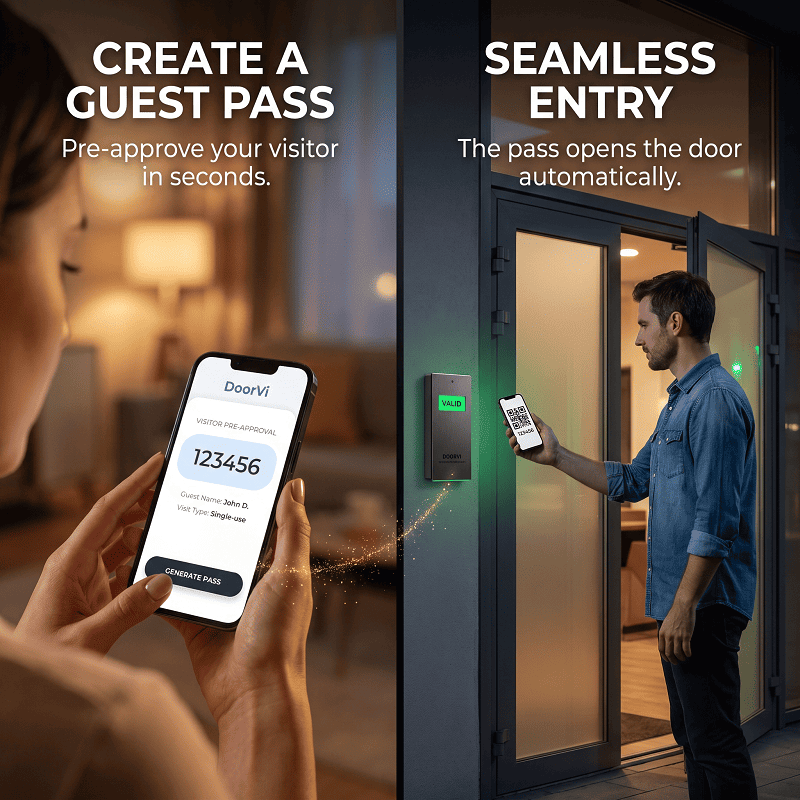
Quick Answer: A digital guest pass lets a resident approve a visitor before they arrive. In DoorVi the resident creates a single-use, date-range, recurring or event pass, the guest gets a six-digit code, and they enter it at the door or lobby tablet without calling anyone.

Key takeaways
- Most visits are planned, so the entry decision can be made before the guest arrives.
- DoorVi has four pass types: single-use, date range, recurring and event.
- The guest needs no app: they scan the QR code at the gate and type the code.
- Every pre-approved entry is logged with the time and the apartment.
- Guests who aren't on the list still scan the QR and video-call the resident, so nothing changes for unexpected visitors.
How visitor pre-approval works (4 steps)
- The resident adds the guest in the DoorVi app: name, date and pass type.
- The resident shares the code with the guest (by message, email or however they like).
- The guest scans the QR code at the gate with their phone camera and types the code. No call is needed.
- The gate or door opens and the visit is logged as pre-approved, with the time and the apartment.
DoorVi, a QR-code video intercom and visitor management platform, uses pre-approval alongside its normal video-call entry. The rest of this guide covers which pass to use, what each person sees, and when a different setup fits better.
Why pre-approve a visitor?
Picture a normal week: the plumber on Tuesday morning, your sister staying Friday to Sunday, the cleaner every Tuesday, and a birthday dinner on Saturday. Each of those visits is known in advance, yet with a classic intercom every one of them means a call, often in the middle of a meeting, and a guest waiting at the gate if you miss it.
Visitor pre-approval moves that decision earlier. You approve the visit once, when it's convenient, and the guest gets in on arrival without anyone answering anything.
Which pass should I use?
| Pass type | What it does | Typical use |
|---|---|---|
| Single-use | Valid for one entry | A plumber, a technician, a one-off guest |
| Date range | Valid between two dates | Family staying for a weekend |
| Recurring | Valid on a repeating schedule | A cleaner every Tuesday, a tutor twice a week |
| Event | One pass shared by a guest list | A birthday party, a meeting, a community event |
For couriers there's a dedicated flow that uses the parcel's tracking number instead of a code: see delivery pre-approval.
Using pre-approval in an office building without a front desk
The user journey
The resident
Before: answers the intercom for every visitor, or leaves names with a doorman who may not be on shift.
After: creates a pass in the DoorVi app in under a minute, shares the code, and gets on with the day. Every entry shows up in the history, marked pre-approved.
The guest
Before: waits at the gate while the intercom rings, or calls the resident's mobile.
After: scans the DoorVi QR code with their phone camera, types the code, and walks in. They don't install an app and don't see the resident's phone number.
The guard or doorman (if there is one)
In the Guard + QR entry mode, the guard keeps using the Guard Doorman app for visitors who need help, while pre-approved guests let themselves in. In QR-only mode, there's no guard at all.
The property manager or síndico
Sets the entry mode for each entrance in the admin dashboard (multi.doorvi.co), uploads residents by CSV, and connects the lock. The visitor log shows who was expected and who actually arrived, which is a clean audit trail for the building. Setup follows the property setup guide, and residents can use the residents' guide.
What happens to visitors who aren't pre-approved?
Nothing changes for them. They scan the same QR code and video-call the resident, who sees them and opens the gate remotely from their phone. Pre-approval just removes the call for the visits you already knew about.
What opens the gate?
Pre-approval is a gate automation feature, so the entrance needs a lock DoorVi can release: an electric strike or maglock on a relay (ESP32, Sonoff, Tasmota or Waveshare), or an existing ProdataKey (PDK) or Brivo access-control door. See relays, PDK and Brivo.
Where it's useful
- Apartments and condomínios: family, friends and service staff without a guard checking names on a list.
- Offices and coworking spaces: expected clients and candidates get in without a reception bottleneck.
- Serviced apartments: a date-range pass for the length of a stay.
- Gated communities with visitor parking: guests reach the gate without waiting; for parking solutions such as reaching a car's owner about wrong parking, see the DoorVi QR tag for cars.
Where DoorVi fits best
- Buildings that want planned visitors to skip the intercom call without adding hardware at the entrance.
- Properties that need a record of who was expected versus who arrived.
- Sites already on PDK or Brivo, or with a simple electric lock on a relay.
- Support within 24 hours: DoorVi's support team resolves support tickets within 24 hours.
When another solution makes more sense
- Buildings that require ID checks for every visitor: keep a staffed reception; DoorVi's Guard + QR mode can still help the guard.
- Entrances with no electric lock and no plan to add one: pre-approval needs a lock it can release.
- Very large events with ticketing: a dedicated event ticketing system may suit better than a shared event pass.
FAQ
Does the guest need the DoorVi app?
No. The guest scans the QR code at the gate with their phone camera and types the code in the web page that opens.
Can I approve someone who comes every week?
Yes. Use a recurring pass, for example for a cleaner every Tuesday.
Can one pass cover a whole guest list?
Yes. An event pass is shared by all the guests on the list for that event.
Is every pre-approved entry recorded?
Yes. The visit appears in the history with the time and the apartment, marked as pre-approved.
What if a visitor isn't on the list?
They scan the QR code and video-call the resident, who can open the gate remotely.
Does the guest see my phone number?
No, not unless you turn on the "Callback Number" option.
What support does DoorVi provide?
DoorVi's support team resolves support tickets within 24 hours.
Related questions
- How do couriers get in when I'm not home? (delivery pre-approval)
- How do delivery drivers get into apartment buildings? (guide)
- Can residents and guards talk through DoorVi? (resident-guard communication)
- What is the best QR code entry system for unattended lobbies? (guide)
Stop managing guest lists on paper
Watch the 1-minute visitor pre-approval demo, then book a 15-minute demo. DoorVi's support team resolves support tickets within 24 hours.
About the author: Sachin Gupta is a Director at DoorVi and works on QR video intercom and access-control deployments for condomínios, apartment buildings and offices in Brazil, the US and India.
By Sachin Gupta, Director, DoorVi · Published 27 September 2026 · Last updated: 3 October 2026